QloApps Forums
    • Register
    • Login
    • Search
    • Categories
    • Recent
    • Tags
    • Popular
    1. Home
    2. Technical Help
    Log in to post
    • Newest to Oldest
    • Oldest to Newest
    • Most Posts
    • Most Votes
    • Most Views
    • K

      Modifying the Customer Fields, changing Hotel to Hostel and changing daily billing to yearly billing
      • knakwue

      2
      0
      Votes
      2
      Posts
      32
      Views

      A

      Hi @knakwue ,

      Regarding your issue — “How do we add additional fields to the customer profile?

      In QloApps, we provide an addon called QloApps Custom Registration Fields, which allows you to collect customized information from your customers.

      With this module, you can easily add new fields to the Customer Registration Form and gather all the information you need.

      You can view the addon here:
      https://qloapps.com/qloapps-custom-registration-fields/

      Regarding your second issue — “How do we change all mentions of Hotel to Hostel in the application?”

      QloApps provides a built-in Translation feature that allows you to modify text throughout the system.

      Please follow the steps below:

      Go to Localization → Translations
      Reference: https://webkul.chatwhizz.com/share/screenshot/67efce91e5eb59058b5a28ac

      Select the appropriate fields under the Modify Translations section
      Reference: https://webkul.chatwhizz.com/share/screenshot/67efe05daf3639058f8e0639

      Search for the text you want to change and update it to your preferred value
      Reference: https://webkul.chatwhizz.com/share/screenshot/67efdfc2af3639058f8e061c

      Save the translations.

      Recommendation:
      If you want to translate or update multiple terms across the entire QloApps theme, we recommend using the QloApps Google Translate module.
      This module helps translate all text at once using Google Translator.

      Check it here:
      https://qloapps.com/qloapps-google-translate-translate-qloapps-easily/

      Regarding your third query — “How do we change daily billing to yearly or half-yearly?”*

      Currently, QloApps works on a per-day pricing model.
      If you want yearly, half-yearly, or any custom billing cycle, please create a support ticket. Our team will guide you based on your specific requirements.

      Create a ticket here:
      https://webkul.uvdesk.com/en/customer/create-ticket/
    • I

      Unable to extend date duration on already booked order
      • iwan01

      2
      0
      Votes
      2
      Posts
      456
      Views

      A

      Hi @iwan01 ,

      To extend the booking date using the Order tab in the back office:

      Reference

      Click on the Edit button and update the check-in and check-out dates as needed.

      Reference

    • I

      Unable to give Permission to Employee
      • iwan01

      3
      0
      Votes
      3
      Posts
      486
      Views

      I

      @Aradhana-Singh Thanks Worked

    • R

      Unable to generate Invoice
      • Rajul Garg

      10
      0
      Votes
      10
      Posts
      611
      Views

      A

      Hi @Rajul-Garg ,

      We have tested the invoice generation feature on our end, and it is working properly without any timeout or error. The issue is related to your server environment, most likely due to timeout limits, missing dependencies, or other server-side restrictions.

      Regarding the mail configuration, the PHP mail function does not work properly in some scenarios.

      We recommend switching to the SMTP method instead for better reliability.

      To update your mail settings:
      1.Log in to your QloApps Back Office.
      2.Go to Advanced Parameters → E-mail.
      3.Select Use my own SMTP parameters.
      4.Enter your SMTP server details and click Save.
      5.Send a test email to confirm it’s working.

    • T

      iCal files as a live link.
      • The Bothy

      1
      0
      Votes
      1
      Posts
      173
      Views

      No one has replied

    • F

      How to disable the rating when loading a new hotel in version 1.7.0.0
      • fabiola

      2
      0
      Votes
      2
      Posts
      464
      Views

      A

      Hi @fabiola,

      Could you please clarify which rating you are referring to?
      Reference: Screenshot 1

      Are you referring to this rating? If yes, this rating is visible on the Room Type page.
      Reference: Screenshot 2

      If this is not the one you meant, please share a screenshot of the rating you are referring to so we can check and assist you further.

    • S

      ACCES DENIED BUG
      • Shakespeare

      2
      0
      Votes
      2
      Posts
      1007
      Views

      V

      Hi @Shakespeare,

      This issue occurs because, starting from MariaDB 10, there are changes in how values are typecast internally. In this case, integers are being typecast to strings when fetching permissions, which leads to conflicts and results in the Access Denied warning even when the profile has all permissions.

      To resolve the Access Denied issue, please refer to the following PR: https://github.com/Qloapps/QloApps/pull/1577

    • T

      Can you remove the Book Now Button from Search page?
      • tciwithsophie

      4
      0
      Votes
      4
      Posts
      1374
      Views

      A

      Hi @tciwithsophie,

      Currently, there is no option to hide the "Book Now" button from the search results page.

      If you would like to hide the button, please create a support ticket so our team can assist you accordingly.

    • J

      MySQL version
      • jayleenkidd

      2
      0
      Votes
      2
      Posts
      1247
      Views

      A

      Hi @jayleenkidd,

      The current latest version of QloApps (v1.6.1) supports PHP 7.4 and MySQL 5.7. To install QloApps on your system, you’ll need to ensure compatibility with these versions.

      Although we’ll be releasing a new version of QloApps soon, which will support PHP 8.0 and MySQL 8.0.

    • N

      Email received is not clean
      • nksmeena

      15
      0
      Votes
      15
      Posts
      4545
      Views

      A

      Hi @tciwithsophie,

      Could you please let us know specifically which parts of the email content are not displaying correctly? Also, if possible, kindly share a clear screenshot of the issue to help us understand it better

    • C

      Book Now Button and Cart Disappeared
      booking • • Chris L

      4
      0
      Votes
      4
      Posts
      1291
      Views

      A

      Hi @Atardecer,

      Thank you for the update. I’m glad to hear the issue has been resolved!

      We will update you shortly regarding your concern about not receiving the password reset email.

    • A

      Changing Language for "Our Rooms" and "What our Guests Say?"
      • Atardecer

      2
      0
      Votes
      2
      Posts
      1165
      Views

      A

      Hi @Atardecer ,

      Regarding your query – “Edit the text for 'Our Rooms'”:

      Go to Admin Panel → Modules and Services → Manage Modules

      🔗 Reference Screenshot

      Search for “hotelroom” in the module list.

      Click on Configure for the Hotel Room module.
      🔗 Reference Screenshot

      Edit the “Hotel Room Block Title” text.

      Select the desired language, then click on the Save button.

      Regarding your query – “Edit the text for 'What our Customers Say?'”:

      Go to Admin Panel → Modules and Services → Manage Modules
      🔗 Reference Screenshot

      Search for “testimonial” in the module list.

      Click on Configure for the Testimonial module.

      Edit the “Testimonial Block Title” text.

      Select the desired language, then click on the Save button.

      After following these steps, your changes will be reflected on the website.

    • T

      Access denied at AdminDashboard
      • thiranuwat

      2
      0
      Votes
      2
      Posts
      988
      Views

      A

      Hi @thiranuwat,

      Regarding your query — "new user logs into the Dashboard but cannot see any menu",

      This issue may be occurring because the required permissions (such as View) have not been set for the profile associated with the user.

      Please recheck all the permissions assigned to the profile, especially the menu access. Also, ensure that the user is correctly assigned to that profile.

      Here’s a reference screenshot :
      https://webkul.chatwhizz.com/share/screenshot/6823203727c29f37d0054fd2

    • A

      New Version not showing while using One click upgrade module?
      upgrade update updating version release • • abbasi

      4
      0
      Votes
      4
      Posts
      2141
      Views

      A

      Hi @abbasi

      Yes it is live and you can use the QloApps 1-Click Upgrade module to upgrade you QloApps to its latest version.

      Important Note: If you have made any custom modifications to your codebase, please ensure you create a backup before upgrading. After the upgrade process, all custom changes will be overwritten and you will need to reimplement them again.

    • B

      Front Desk addon module do not show operations today like in regular dashboard
      • bernie

      2
      0
      Votes
      2
      Posts
      1023
      Views

      A

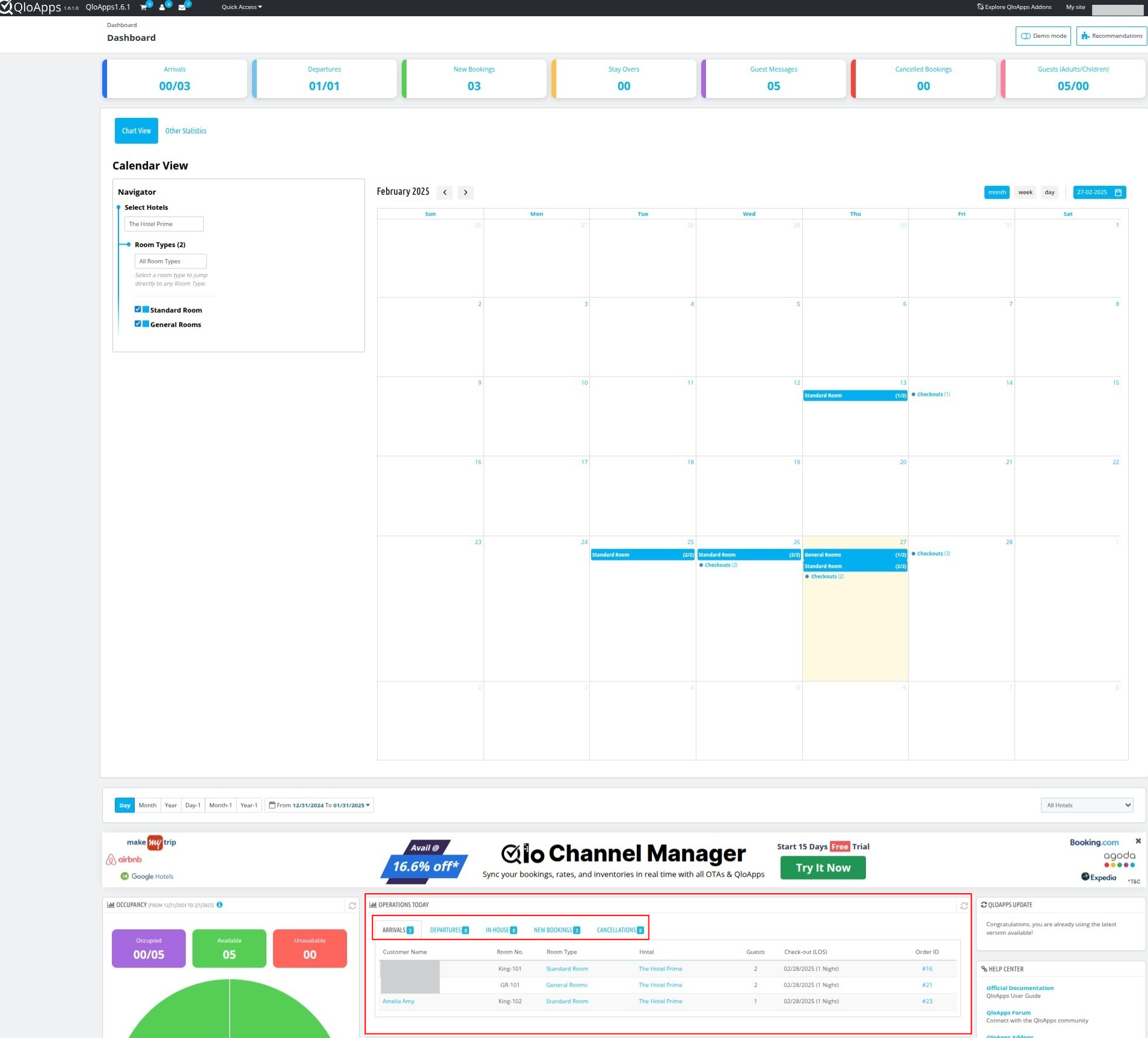
      Hi @bernie,

      Please refer to the image given below:
      screenshot_1740664566490.png

      The operations statistics, such as arrival and departure data along with guest names and room numbers, are displayed under "Operations Today."

      If you were referring to something else, please provide more details.

    • C

      Configuration missing in the Edit option of Manage Room Type
      • clicker

      2
      0
      Votes
      2
      Posts
      1167
      Views

      V

      Hi @clicker,

      In QloApps 1.6.1.0, the "Configuration" setting has been renamed to "Rooms" for better clarity and usability.

    • C

      Payment Option is not visible after installing payment gateway module
      • chiragsoni2401

      2
      0
      Votes
      2
      Posts
      1007
      Views

      S

      PayPal requires a public URL and an SSL-enabled domain to function properly. Since you are currently working on localhost, PayPal will not work in this environment.

      Please try using it on a public domain with SSL (HTTPS) enabled for proper functionality.

      Regarding the custom Razorpay module not showing as a payment option after checkout

      the payment options on the checkout page in the front end are displayed using the displayPayment hook in QloApps.

      To understand how this works, you can:

      Check Hooks usage in QloApps developer docs – Visit QloApps Hooks Documentation for details on how hooks function. Review Existing Payment Gateways – Look into the code of already provided payment modules like PayPal or Bank Wire to see how they implement the displayPayment hook.
    • C

      While click invoice tab.php error
      • csugesh

      3
      0
      Votes
      3
      Posts
      1057
      Views

      V

      Hi @csugesh,

      To resolve this issue, please refer to the following PR: PR Link.

    • C

      QloApps Data Cleaner is missing in 1.6.1
      • clicker

      4
      0
      Votes
      4
      Posts
      1180
      Views

      V

      Hi @clicker,

      Please try searching again using "Cleaner" or "QloApps Data Cleaner" in the modules catalog page, ensuring there are no extra spaces in the search input.

      If the issue persists, please create a ticket at UVdesk Support so our team can assist you accordingly.

      Thanks!

    • I

      Book Now - not adding to cart
      • irfan

      16
      0
      Votes
      16
      Posts
      3827
      Views

      A

      To resolve issue on the "Book Now" page where rooms are not being added to the cart.

      Use the following PR: Pr Link